
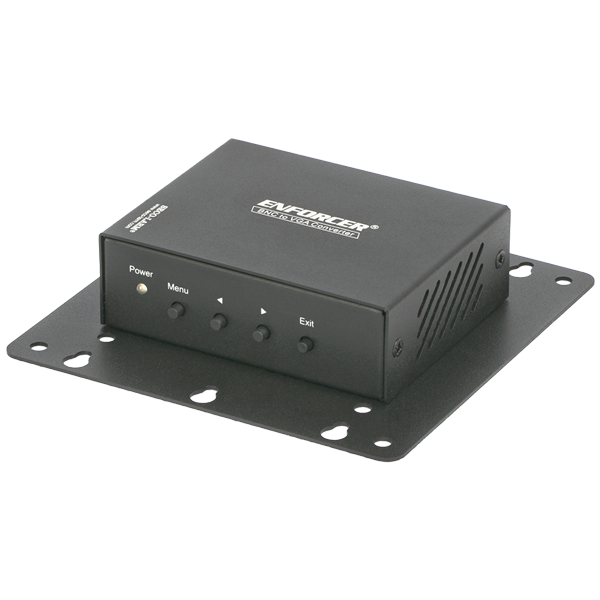


VC-3BAQ

BNC-to-VGA Converter – Up to 1280×1024 resolution (Discontinued)

Discontinued Product: Product replaced by VC-3YAQ

The BNC to VGA converter allows a display with a VGA input to display BNC video signals. Traditional CCTV monitors can now be replaced by any display unit with a VGA input, including most LCD monitors.

The converter is compact and can be mounted nearly anywhere. For example, the included VESA bracket mount can be installed onto most VGA monitors with VESA mounting holes.

  • product_icon
  • product_icon
  • Converts almost any VGA monitor into a security monitor
  • Dual output for VGA and BNC
  • Compact, unit is perfect for plug and play installations
  • Desktop, wall, or VESA mountable (VESA mount included)
  • On screen display (OSD) for image adjustment
  • Automatically detects NTSC/PAL
  • Video input auto-configure
  • Memory retains settings after power failure
  • Gold-plated BNC connector for longer life
  • Supports resolutions up to 1280×1024
  • Includes 5VDC power supply
VESA mount75×75 mm, 100×100 mm
TypeBNC to VGA
Input SignalComposite video 1Vp-p 75ohm BNC jack
Output SignalVGA: 0.7 Vp-p RGB, 15 pin female D-sub, Composite video 1Vp-p 75ohm BNC
Maximum ResolutionUp to 1280×1024, NTSC: 720×480 PAL: 720×576
Current Draw800mA@5VDC
Power supply1A@5VDC, 2.5mm
Dimensions3-3/8″x3-1/4″x1-1/16″ (85x83x27 mm)
Weight7.2-oz (205g)
Product Information Sheet (PI) (pdf, 336KB)
Manual (pdf, 375KB)
Diagram (pdf, 79KB)
VGA device does
not function
correctly
  • Make sure power, input, and output cables are firmly connected to the converter.
  • Make sure the video input device is turned on.
  • Make sure the video output device is turned on.
  • Test the coaxial cable between the video source and converter to ensure it is
    functional.
  • Test the VGA cable between the video monitor and converter to ensure it is
    functional.
  • Ensure the monitor used can support the resolution selected
Power LED
indicator not lit
  • Make sure power is connected to the converter


Scroll to Top