
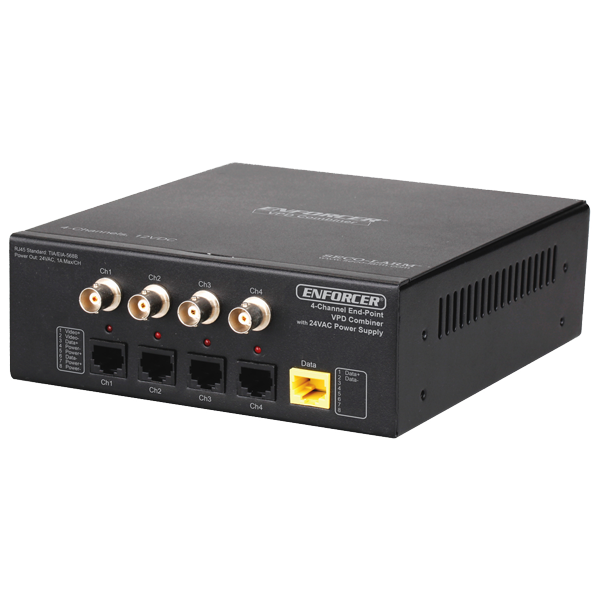



EB-C304-01EQ

4 Channel Video/Power/Data Active Endpoint Combiner

ENFORCER VPD (Video/Power/Data) Combiners work in conjunction with standard passive VPD baluns and RJ45 cables to simplify and organize a large scale CCTV installation. Using this allows for increased flexibility and simplified, more organized cable installation, providing power to cameras while delivering high quality video all over a single CAT5e/6 cable. Troubleshooting is therefore greatly simplified and clutter reduced. ENFORCER VPD Combiners are compatible with all HD analog, including HD-AHD, HD-CVI, and HD-TVI, as well as traditional analog formats.

  • product_icon
  • product_icon
  • product_icon
  • Video, power, and data over a single category cable
  • Compatible with all traditional and HD analog formats, including HD-AHD, HD-CVI, and HD-TVI
  • Built-in passive transceiver baluns
  • Used in end-span applications
  • Supports up to four (4) cameras
  • Power LED indicator for each channel
  • Can transfer HD Analog video up to 1,476ft (450m)*
  • Integrated 24VAC power supply
*720p HD-CVI video; other formats will have different maximum ranges
Type24VAC endpoint
Channels4
Video Range – CVBS984’ (300m)
Video Range – HD-AHD720p: 1050’ (320m); 1080p: 722’ (220m)
Video Range – HD-CVI720p: 1476’ (450m); 1080p: 820’ (250m)
Video Range – HD-TVI720p/1080p: 820’ (250m)
Video FormatNTSC, PAL, SECAM
Maximum Input1.0Vp-p
Insertion Loss0.3dB per pair from 20kHz~60Mhz
Frequency ResponseDC to 60MHz
CMMR60dB, 20kHz~60MHz
Wire CategoryCAT5e~CAT6
BNC ConnectionNickel-plated
Impedance – Coax75Ω@1MHz
Impedance – RJ45100Ω@1MHz
Max. Amperage1A@24VAC
Data Range2,400’ (800m)
DC Loop Resistance29Ω/1,000’ (9.5Ω/100m)
Differential Capacitance19pF/ft max (62pf/m max)
Output Voltage26VAC
Fuse1.5A max/CH
Input Power110VAC
Input Power FuseF2AL250V
Operating Temperature-14~140°F (-10~60°C)
Operating Humidity0~95%, non-condensing
MaterialSteel
Weight5.72-lbs (2596g)
Dimensions6-5/16” x 2-3/16” x 6-11/16” (160mm x 55mm x 170mm)
Product Information sheet (PI) (pdf, 606KB)
Manual (pdf, 1914KB)
Wavy or ghost image if connected to
image processor (e.g., multiplexer or
DVR), but not if directly to monitor
  • Move the Cat5e/6 cable away from possible sources of interference.
  • Ensure that the same twisted pair connects to a balun at both ends of the cable.
  • Replace the cable with a new Cat5e/6 cable
Image is wavy and shakes
  • Try reversing polarity of the two wires at one end of the Cat5e/6 cable.
Image is weak or faded
  • Double-check that the Cat5e/6 and BNC cables are connected properly.
  • Run a continuity test on all wires in the cable.
  • Check that the camera and monitor are powered up
No image.
  • Clear the memory of the service button channel in case any Sensors were accidently paired
PTZ Controls do not work
  • Reduce the Cat5e/6 cable length.
  • Refer to your PTZ camera manual.
Power LEDs are OFF
  • Check that the power supply is ON.


Scroll to Top