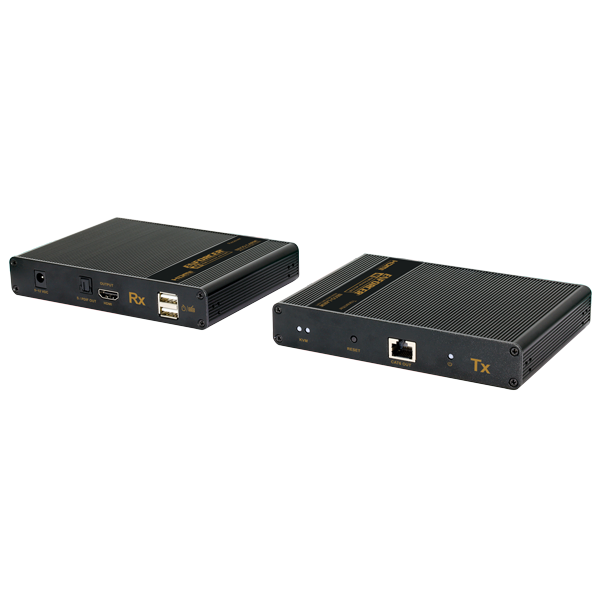
MVE-AH1E1-42UQ

HDMI® Extender with KVM – 4K (Discontinued)

Discontinued Product: Replaced by MVE-AH1E1-43U

The ENFORCER HDMI Extender with KVM allow you to transmit HDMI audio and video as well as a USB (2.0) signal up to 230ft (70m) over a single Cat6 cable using an active transmitter and receiver, allowing remote operation of a device such as a computer or NVR/DVR. The extenders also provide HDMI loop-out and KVM.

  • product_icon
  • product_icon
  • product_icon
  • product_icon
  • Display up to 4K@60Hz
  • Zero-latency transmission up to 230ft (70m) over single Cat6/7
  • Supports USB keyboard and mouse (KVM)
  • Supports point-to-point connections
  • Transmitter includes HDMI loop-out
  • Lightning Protection, surge protection, and ESD protection.
  • Receiver has an optical S/PDIF out if an AVR or sound bar is fitted in the remote location
Input video signal3.3V
Input DDC signal5Vp-p (TTL)
Maximum signal link range230ft (70m)
Video formats supportedHigh-speed HDMI, HDCP 2.2
Audio formats supportedLPCM, DTS HD, DTS Audio, Dolby Digital 5.1CH
Output VideoHDMI
Resolutions supported4K@60Hz, 4K@30Hz, 1080p, 1080i, 720p, 576p, 576i, 480p, 480i, 1680×1050, 1680×1050, 1600×900, 1366×768, 1360×768, 1280×960, 1280×800, 1280×720, 1024×768, 800×600
Range (Cat6/6A/7)Up to 230ft (70m)
Video input connectorHDMI Type A 19-pin female
Maximum input cable length26ft (8m) AWG24
Video output connectorHDMI Type A 19-pin female
Maximum output cable length26ft (8m) AWG24
Cat6 Wiring standardT-568B
Operating voltage5~12 VDC
Power supply5VDC@2A
ESD Protection±8kV (air-gap discharge), ±4kV (contact discharge)
Current DrawTransmitter & Receiver: <4W
Operating humidity0~90%
Operating temperature-4°~140° F (-20°~60° C)
Dimensions5-13/16″x4-1/2″x1″ (148x105x25 mm)
Weight9.2-oz (260g)
Product Information Sheet (PI) (pdf, 947KB)
Manual (pdf, 414KB)
HDMI device does not function correctly
  • Use T568-B wiring standard
  • Make sure the extender is powered on both sides
  • Make sure the source and display are powered
  • Test the cable between the receiver and transmitter to make sure it is functional
  • Make sure there are no problems with the HDMI source, HDMI cables, or HDMI display by plugging the source directly into the display using an HDMI cable
Screen flickering or brief image loss
  • Use a higher grade of twisted pair category cable (Cat6/7 is recommended)
  • Switch the source device to a lower HDMI output (e.g., 1080p to 1080i)
  • Restart the handshake process by powering everything down then powering up and connecting each device in succession starting with the HDMI source
Scroll to Top